An E-Learning QA Process That Scales: Review Rounds, Severity and Sign-Off
20 min read
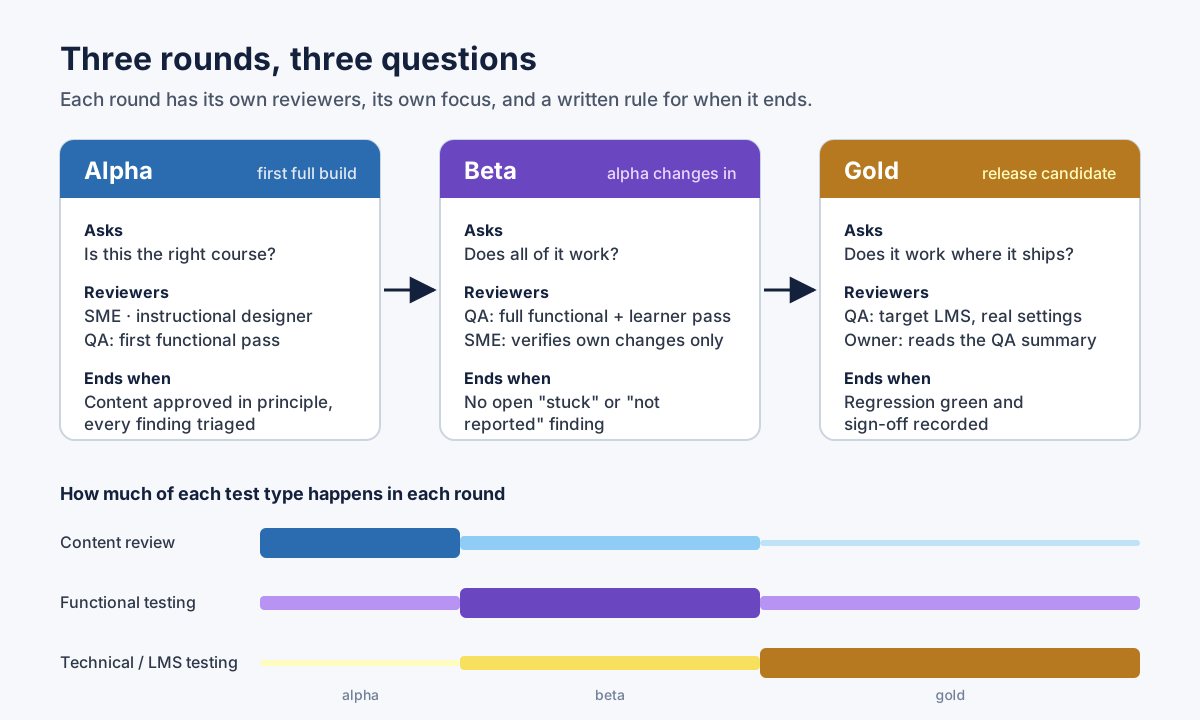 Three rounds, three different questions. The rounds only work when each one has a written rule for when it ends.
A good e-learning QA process is not a longer checklist. It is an agreement about who reviews what, in which round, how serious each finding is, and what "done" means. Get those four things written down before the first build goes out, and a team of two or a studio of twenty can ship courses without the review cycle turning into an endless comment thread.
This post is about the process, not about specific bugs. If you want the bugs, I cover them in the Storyline QA checklist and in common Storyline bugs. Here I cover the rounds (alpha, beta, gold), the three kinds of testing, the roles, a four-level severity scale, how to write a bug report a developer can act on, how to stop re-reporting design decisions, regression after fixes, and sign-off. There is a copy-ready process checklist and a bug report template near the end.
I have built more than 140 Articulate Storyline courses, most of them alone and some with a team around me. The process below is the one that survived both situations.
Why an e-learning QA process breaks as the team grows
When one person builds and tests a course, QA lives in their head. They know which slide is fragile, which button they wired last, and which feedback the SME already rejected. The process is invisible, and it works.
Add an SME, a second developer, a client reviewer and a project manager, and the same course now gets five kinds of feedback in four places. The SME comments on wording in the review link. The client sends a spreadsheet. The project manager forwards an email that says "the quiz doesn't work." The developer fixes what they can find, republishes, and nobody knows which comments apply to which build.
Three things usually go wrong:
- Everything is one severity. A typo and a gate that never opens arrive in the same list, with the same weight. The team fixes the easy ones first, because they are easy.
- Nobody owns the end of a round. Feedback keeps coming, so the round never closes, so the next round never starts.
- Design decisions get reported again in every round. A reviewer flags the grey buttons on the game board as "not working." The designer explains. In the next round, a different reviewer flags them again.
The process below fixes these three problems with structure, not with more effort.
The three review rounds: alpha, beta, gold
Alpha, beta and gold are the common names for the review rounds in custom e-learning development. eLearning Industry has a useful overview of alpha, beta and gold stages: alpha establishes the course foundation, beta is a more polished version that goes through testing, and gold is the final product ready for the LMS. Your contract might call them something else, or have only two. The names matter less than the rule that each round asks a different question.
Alpha: is this the right course?
Alpha is the first complete build, made from the approved storyboard. It is the first time the SME sees their content as a learner will see it, and that changes how they read it. Expect wording changes, a request for one more example, a question about whether an interaction teaches what it should.
Alpha is the right place for content changes, and the wrong place for pixel feedback. If a whole section is going to be rewritten, there is no point reporting that its title is two pixels off.
QA still does a first functional pass in alpha, but a short one. The goal is to catch structural problems early: a branching structure that cannot work, a completion rule that does not match the design, a navigation pattern the client did not expect. These are expensive to change later.
Alpha ends when the content is approved in principle and every finding has been triaged: accepted, rejected with a reason, or deferred to beta.
Beta: does all of it work?
Beta contains every accepted change from alpha. The content should now be stable, and the focus moves to function. This is the round for the full QA pass: every slide, every layer, every state, every variable, every quiz path, and at least one complete learner pass from the first slide to completion.
The SME has a smaller job in beta. They check that their own alpha changes were made the way they meant them, and they read the text they did not see in alpha, usually feedback layers and quiz distractors. They should not start a second content round. If they want to, that is a scope conversation, not a QA finding.
Beta ends when there is no open finding at the two top severity levels (more on those below), and every lower finding has a decision.
Gold: does it work where it ships?
Gold is the release candidate. It is published with the final settings, for the final standard (SCORM 1.2, SCORM 2004, xAPI or cmi5), and tested in the environment it will actually run in. The question is no longer "does the course work?" but "does this package work in this LMS, with these settings, for a real learner?"
Most of gold is technical testing and regression. If gold produces content changes, something went wrong earlier, and it is worth asking what.
Gold ends with sign-off, which has its own section below.
Content, functional and technical testing are three different jobs
Rounds answer "when." Test types answer "what." There are three, and they need different people and different builds.
Content review asks whether the course says the right thing. Accuracy, completeness against the storyboard, terminology, tone, the form of address, spelling. This is mostly the SME's and the instructional designer's job, and it happens mostly in alpha.
Functional testing asks whether the course does what it should. Every button responds, every layer opens and closes, every gate can be met, every quiz scores correctly, media plays and resumes, and a learner can get from the first slide to the last. This is QA's job, and it peaks in beta.
Technical testing in the LMS asks whether the package behaves correctly in its real environment. It launches, it resumes, it reports completion and score, and the completion rule fires when it should and not before. Articulate's article on when a course communicates completion to an LMS has the rule every QA lead should know by heart: when several tracking options are set, "whichever option a learner completes first" is the one reported. If the client LMS is not available early, a neutral sandbox like Rustici's SCORM Cloud separates "the course is broken" from "this LMS is unusual." I go deeper on this in why a Storyline course is not reporting completion.
The mistake I see most often is mixing the three in one review. A reviewer who is reading for accuracy does not notice that Next never turned on, because they used the menu. A reviewer who is clicking every button does not notice that a paragraph is from the wrong slide. Give each review one job.
Who reviews what: SME, instructional designer, QA
| Role | Owns | Reviews in | Does not own |
|---|---|---|---|
| SME | Accuracy, completeness, terminology | Alpha (full), beta (own changes, feedback text) | Layout, function, LMS behavior |
| Instructional designer | Learning flow, interactions, tone, consistency with the design | Alpha and beta | Subject accuracy |
| QA | Function, the learner path, severity, regression, the LMS test | Alpha (short), beta (full), gold (full) | Content decisions |
| Developer | Fixing, republishing, build numbers | Responds in every round | Closing their own findings |
| Project owner | Accepting the QA summary, sign-off | Gold | Re-testing |
Two rules make this table work.
First, the person who reports a finding is the person who closes it. A developer can mark a finding "fixed," but only the reporter, or QA on their behalf, marks it "verified." Otherwise "fixed" means "I changed something."
Second, the instructional designer is the tie-breaker between the SME and QA. When an SME asks for a change that breaks the interaction design, or QA reports something that is a deliberate design choice, the designer decides. Without a named tie-breaker, the loudest reviewer wins.
The Training Industry article on optimizing the e-learning QA process makes a related point well: agree on the review steps, who takes part and the timeline before the work starts, and focus each kind of feedback on the stage where it belongs. That agreement is cheaper to write in week one than to negotiate in week six.
A severity scale built around the learner
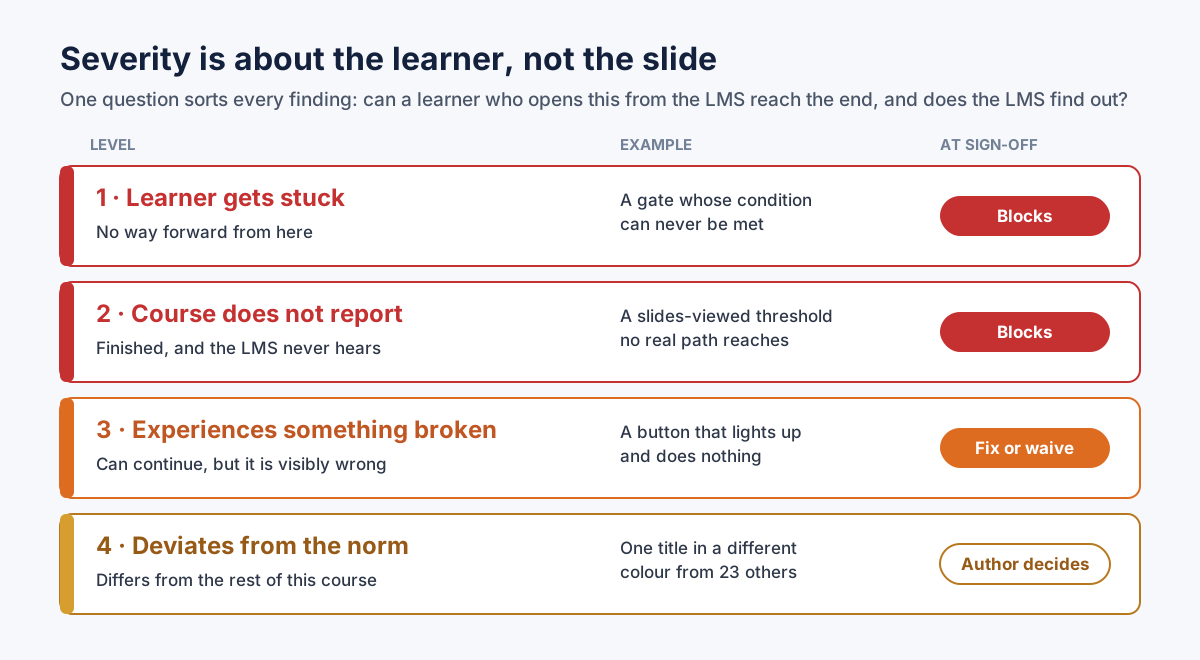 Four levels, sorted by what happens to the learner. The top two block sign-off with no exceptions.
Most bug trackers come with a generic scale: blocker, critical, major, minor, trivial. It works, but it makes reviewers argue about words. Is a broken image "major" or "minor"? It depends who you ask.
For e-learning, I use a scale that sorts every finding by one question: can a learner who opens this course from the LMS reach the end, and does the LMS find out?
1. The learner gets stuck. There is no way forward. A gate whose condition can never be met, a layer that opens and has nothing in it that leads anywhere, a video that pauses at a cue point and never resumes, a Next button that never turns on. One finding at this level makes the course a failure, however polished the rest is.
2. The course does not report. The learner reaches the end, and the LMS still says "incomplete." From the client's side, this is as bad as level 1: the learner did the work and has no record of it. A completion threshold no real path reaches, a completion trigger on a slide nobody visits, a quiz result that is never submitted.
3. The learner experiences something broken. There is a way forward, but something is visibly wrong. A button that lights up and does nothing, a missing image, narration with no way to pause it, player arrows that point the wrong way in a right-to-left course.
4. It deviates from the course's own norm. A title in a different color from the other titles, one button out of six without a Hover state, one sentence that addresses the learner differently from the rest of the course. Worth reporting. Possibly intentional.
The scale also writes the sign-off rule for you. Levels 1 and 2 block release, with no exceptions and no waivers. Level 3 is fixed before release, or waived in writing by the project owner with a reason. Level 4 is the author's decision.
Notice what the scale does not use: the number of slides affected, how long the fix takes, or who reported it. A single level-1 finding outranks twenty level-4 findings. Sort the list by level, and the conversation about what to fix first is over before it starts.
How to write a bug report someone can act on
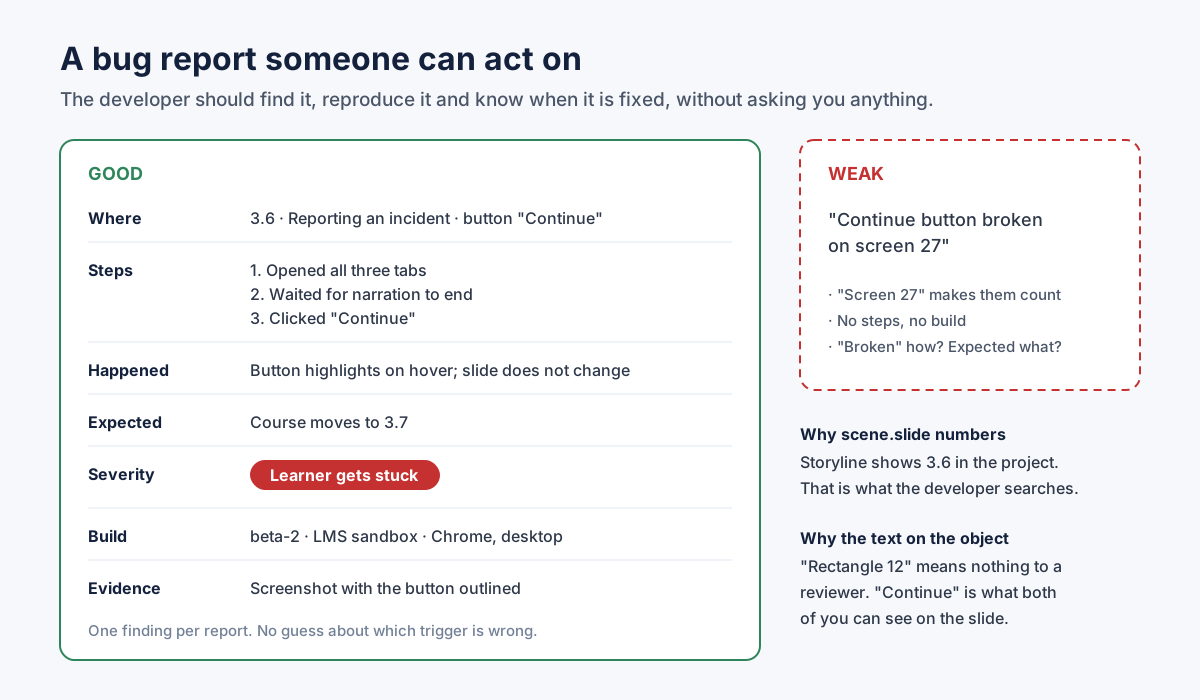 A finding the developer can find, reproduce and verify without a follow-up question.
A bug report has one job: let someone who was not there find the problem, see it happen, and know when it is fixed. Most weak reports fail at the first step.
Where. Use the course's real numbering. In Storyline that is scene and slide: 3.6 is the sixth slide in the third scene, and it is the number the developer sees in the project. A running count like "screen 27" forces them to count, and they will count differently than you did, especially if the course branches. Add the scene or slide name, and then identify the object by the text on it: the "Continue" button, the "Submit" button, the tab labeled "Phishing." Do not use the object's internal name. "Rectangle 12" means nothing to a reviewer, and three objects on the slide might share it.
Steps. What you did, in order, from a known starting point. "Opened all three tabs, waited for the narration to end, clicked Continue." Most e-learning bugs depend on the path. A gate that works when you click the tabs in order can fail when you click them in reverse.
What happened. What the learner sees, not your theory of the cause. "The button highlights on hover and the slide does not change." Not "the trigger is missing."
What was expected. One sentence. "The course moves to 3.7." This is the line that turns a complaint into a testable statement, and it is the line most often left out. If you cannot write it, you may have found a question for the designer rather than a bug.
Severity. One of the four levels above.
Build and environment. The build number or date, where you ran it (review link, LMS sandbox, the client LMS), and the browser and device. A finding without a build number cannot be verified, because nobody knows which version it applies to.
Evidence. A screenshot with the object outlined. A short screen recording for anything that depends on timing.
Atlassian's bug report template for Jira uses the same core fields (severity, environment, reproduction steps, and expected versus actual results), which is a good sign that this structure carries over between tools.
Two more rules. One finding per report. "Several issues on slide 4" cannot be marked half-fixed. And do not prescribe the fix unless you built the course. "Please add a Jump to Slide trigger" is a guess about the cause. If the guess is wrong, the developer either follows it and breaks something, or ignores it and has to explain why. "Continue does not respond" is complete. I write more about this when the course comes from an outside team, in how to QA a vendor's e-learning course.
Check consistency against the course itself, not only the style guide
Style guides are useful. They set the brand font, the color palette, the logo position. But a style guide cannot tell you that one feedback layer in a course of forty uses a different title size, because the style guide does not know this course exists.
The more useful comparison is the course against itself. Find what repeats, then look at the exceptions. If 23 slide titles are dark blue and one is black, the black one is worth a question. If every button in the course has a Hover state except the two on slide 5.2, those two were probably missed. If the whole course addresses the learner informally and one paragraph switches to formal language, that paragraph probably came from an older document.
This works for behavior, not only for appearance. If every tab interaction in the course marks a tab as visited and one does not, that one deserves a look.
Two things keep this honest.
First, word it as a deviation, not an error. "This title is the only one of 24 in black" invites a decision. "This title has the wrong color" claims a rule nobody wrote. The majority can be wrong, too: if the old color survived on 20 slides and the new one is on 4, the four are the correct ones. The author decides.
Second, count within the right group. A course in two scripts, such as Hebrew and English, legitimately uses two fonts, one for each. Count fonts per script, or every English word will look like a deviation. Compare buttons with buttons in the same role, not with every shape in the course.
"This is intentional": stop reporting design decisions every round
Storyline gives designers a blank canvas. A square does not have to change through predefined states; it can use hidden layers, motion paths or variables. Two developers given the same content will build different things: a simulation, a board game, an escape room. That freedom is the point of the tool, and it is also why so many QA findings turn out to be design decisions.
Before you report anything that is not clearly broken, ask one question: could a skilled designer have built it this way on purpose? A game board where finished categories turn grey and stop responding. A course with no hover effects anywhere. Feedback held back until a results slide instead of shown after each question. Each of these looks like a bug to a rule, and each is a legitimate choice.
The short list of things that are always wrong is short on purpose: something is broken, missing, unreachable, or impossible to finish. Everything else is a deviation from the course's own pattern, and deviations can be intentional.
When the designer confirms that something is intentional, record it so it is never reported again:
- Keep a "by design" log for the course, one line per decision: where, what, why, who confirmed it, and the date. "5.1 to 5.6, finished categories turn grey and do not respond: game mechanic, confirmed by the ID, 12 May."
- Put a link to the log in the review instructions for every round, and ask reviewers to check it before they report.
- In your tracker, close these findings with a distinct resolution such as "By design" rather than "Won't fix." The difference matters at sign-off: "won't fix" is a defect someone accepted; "by design" is not a defect.
- If the same "by design" decision appears in every course you build, move it into your team's design standard so new reviewers know it from day one.
This log is also a quiet quality signal. If one kind of finding keeps getting closed as "by design," your reviewers need a better brief, not more findings.
Review tools: Review 360, spreadsheets and Jira
The tool matters less than one rule: every finding lives in exactly one place, and that place records the build it applies to.
Review 360 is Articulate's review app, and for SME and stakeholder feedback it is hard to beat. You can publish an entire course, a scene or individual slides to it, share a link, and reviewers comment in context on the slide they are looking at. According to Articulate's guide to publishing a course to Review 360, you can publish a new version of an existing item, and Review 360 keeps the version history. That makes it natural to align versions with rounds: alpha, beta and gold are three versions of one item. With integrated Review 360 comments, the developer can reply to and resolve comments from inside Storyline 360.
Review 360 is a review environment, not an LMS, so it is the right place for content and much of the functional review, and the wrong place for completion and reporting tests. Those belong in gold, in the LMS or a sandbox.
Spreadsheets are the right tool more often than people admit. For a single course with a small team, a shared sheet with one row per finding and columns for the template fields below is fast, filterable and needs no training. It breaks down when several courses run in parallel or when you need a history of who changed what.
Jira (or any issue tracker) earns its setup cost when a studio runs many courses at once, when developers already live in it, or when the client asks for an audit trail. Use one issue per finding, a custom field for the four severity levels, a field for the build, and a "By design" resolution. The Jira bug report template mentioned above is a reasonable starting point; rename its severity values to the four levels so reviewers do not have to translate.
A pattern that works for many teams: SME comments stay in Review 360, where they are in context; QA findings go to the sheet or tracker, where they carry severity and build; and the QA lead copies any SME comment that turns out to be a functional bug into the tracker, with a link back.
Regression after fixes
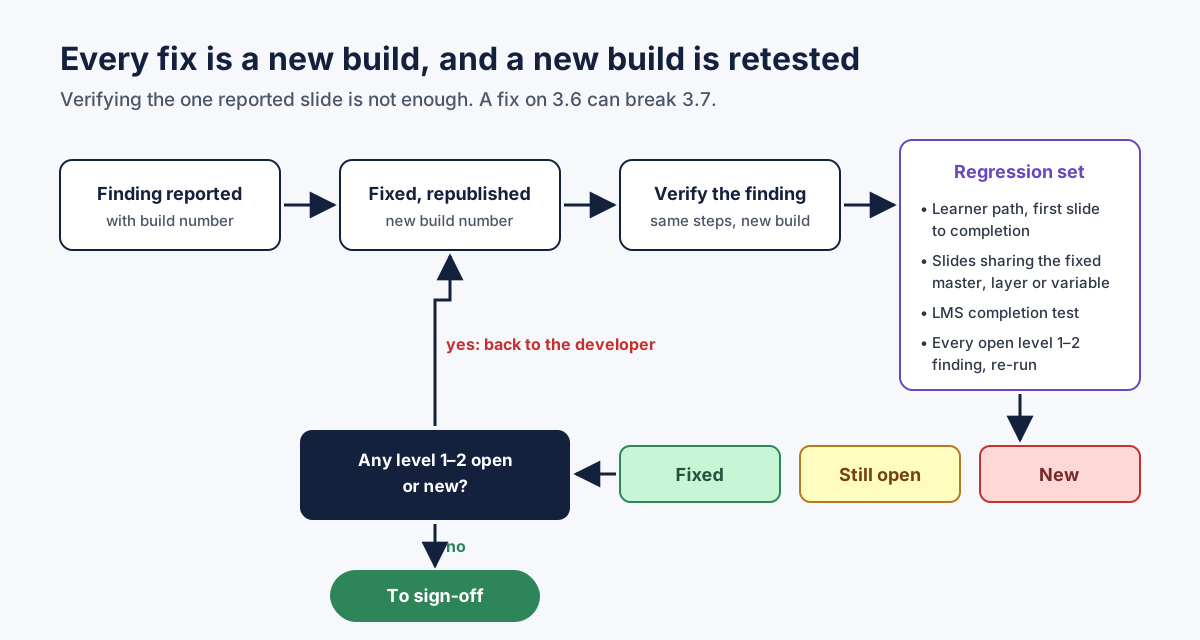 Verify the finding, then retest what the fix could have touched. Fixed, still open and new are three different lists.
Every fix produces a new build, and every new build can break something that worked. Storyline makes this especially easy: fixing a trigger on a slide master changes every slide that uses that layout, renaming a variable affects every condition that reads it, and duplicating a slide to fix it can leave the old copy in a branch somebody still visits.
So a fix is verified in two steps.
Verify the finding. Run the exact steps from the report on the new build. If the result now matches "expected," the finding is verified. If not, it goes back with a note, not a new report.
Run the regression set. A fixed list that runs on every new build from beta onwards:
- One complete learner pass, from the first slide to completion, without the menu.
- Every slide that shares a master, layer or variable with something that was fixed.
- The LMS completion test: launch, finish, check the status. Then close halfway and relaunch to test resume.
- Every finding that was ever at level 1 or 2, re-run, because these are the ones that matter most if they come back.
Sort the results into three lists: fixed, still open, and new. "New" is the important one. A build that fixes ten findings and introduces one level-1 finding is worse than the build before it.
Keep finding numbers stable between builds. If finding 14 is "Continue on 3.6 does not respond" in beta-1, it is still finding 14 in beta-2, whether open or fixed. Renumbering every round makes it impossible to see whether something came back.
Sign-off: what "done" means
Sign-off is a decision, not a feeling. Write the criteria into the project plan before alpha, so nobody negotiates them at the end.
A sign-off I would put my name on contains:
- The build. The exact package that was tested: file name, build number, publish date, standard and tracking settings. Sign-off applies to this build only. If anything is republished, it is a new build and it needs at least the regression set again.
- The environment. Where gold was tested: the client LMS, or a sandbox if that was the agreement, with browsers and devices.
- The counts by severity. Zero open at level 1. Zero open at level 2. Every level-3 finding either fixed or waived, with a name and a reason for each waiver. Level 4: the list, with decisions.
- The "by design" log, attached, so the next reviewer does not start over.
- Known limitations, in plain words. "Narration has no captions; agreed with the client at kickoff." Better written here than discovered later.
- The names. Who tested, who accepted, and the date.
The project owner signs the QA summary, not the course. They should not need to re-test anything. If they feel they must, the summary was not clear enough, and that is worth fixing for the next project.
Copy-ready e-learning QA process checklist
| # | Stage | Step | Done when |
|---|---|---|---|
| 1 | Kickoff | Rounds, reviewers and the deadline for each round agreed in writing | Everyone knows when their review starts and ends |
| 2 | Kickoff | Severity scale and sign-off rule agreed | Levels 1–2 block release; level-3 waivers need a name |
| 3 | Kickoff | Target LMS, standard and completion rule written as one sentence | "Complete when the learner passes the final quiz" |
| 4 | Kickoff | One place for findings chosen | Review link for SME comments; sheet or tracker for QA findings |
| 5 | Kickoff | Bug report template shared with every reviewer | Reviewers use it from the first finding |
| 6 | Alpha | Content review by SME and ID against the storyboard | Content approved in principle |
| 7 | Alpha | Short functional pass by QA | Structural problems found early |
| 8 | Alpha | Every finding triaged | Accepted, rejected with reason, or deferred |
| 9 | Beta | SME verifies own alpha changes and reads feedback and distractor text | No new content round opened |
| 10 | Beta | Full functional pass: every slide, layer, state, variable and quiz path | Every interactive object tried |
| 11 | Beta | Learner pass from the first slide to completion, without the menu | Reached the end |
| 12 | Beta | Consistency checked against the course itself | Deviations reported as deviations |
| 13 | Beta | "By design" log started and shared | Confirmed decisions never re-reported |
| 14 | Every build | Build number on every finding and every package | No finding without a build |
| 15 | Every build | Reported findings verified by the reporter | "Fixed" becomes "verified" |
| 16 | Every build | Regression set run | Fixed, still open and new listed |
| 17 | Gold | Published with final settings and standard | Same settings as release |
| 18 | Gold | Tested in the target LMS or agreed sandbox | Launch, completion, score and resume recorded |
| 19 | Gold | Zero open level-1 and level-2 findings | Counts in the summary |
| 20 | Sign-off | Summary with build, environment, counts, waivers, by-design log and names | Signed and dated |
Copy-ready bug report template
ID:            (stable across builds, e.g. 14)
Title:         [scene.slide] what happens, in a few words
Where:         Slide 3.6 · scene/slide name · object: the text on it ("Continue")
Build:         beta-2 · published 2026-05-12
Environment:   Review link / LMS sandbox / client LMS · browser · device
Steps:         1.
               2.
               3.
What happened: (what the learner sees, not the cause)
Expected:      (one sentence)
Severity:      1 Learner gets stuck · 2 Course does not report ·
               3 Experiences something broken · 4 Deviates from the norm
Evidence:      screenshot with the object outlined / short recording
Status:        Open · Fixed (developer) · Verified (reporter) · By design · Waived (name, reason)
Where an automated scan fits in the process
Most of the time in a review round goes to the mechanical part: clicking every button, opening every layer, tracing every variable, comparing every title against the others, and running the learner pass again after each fix. That is the part I built Story Checker for. It does not replace the SME, the instructional designer or the LMS test. It gives QA a first pass on every build, so people spend their time on judgment.
Story Checker scans a published Storyline course, uploaded as a ZIP (a Web or LMS publish), and, if you have it, the .story file; for the full results, upload both. The scan runs on a server in the EU (Frankfurt). During the scan the course plays in an isolated browser where every attempt it makes to reach the internet is blocked, and the report ends with an evidence line showing what was tried and blocked. The course files are deleted once the scan succeeds. It clicks through the course like a learner, from the first slide, to find where a learner gets stuck. It learns the course's own norms for fonts, colors and states and reports what deviates, with the count, instead of enforcing a fixed style guide.
Several of its habits map directly onto this process. Findings are sorted by severity, with "the learner gets stuck" at the top. Each finding is located down to the exact word or object, with a red frame on the screenshot and the slide numbered as in Storyline, and comes with a fix in Storyline's own terms. A finding the designer confirms as intentional can be marked with "Mark as intentional" in the report, and it is remembered for that course rather than reported again. Finding numbers stay stable between scans, so the report shows what was fixed, what is still open and what is new since the last build. The 48 checks are deterministic, not AI-based: the same course gives the same report.
Two honest limits. It is not an accessibility checker; Storyline 360 has a built-in one, and you should use it. And it does not replace the gold test in your real LMS, because no tool can tell you how one particular LMS behaves with one particular package.
FAQ
What are the alpha, beta and gold stages in e-learning?
They are three review rounds. Alpha is the first full build, reviewed mainly for content and flow. Beta includes the alpha changes and is reviewed mainly for function. Gold is the release candidate, tested in the target LMS and signed off.
How many review rounds should an e-learning project have?
Three is common and works well for custom courses. Small updates can use two. What matters more than the number is that each round has a defined question, defined reviewers and a written rule for when it ends.
What is the difference between severity and priority in e-learning QA?
Severity describes the impact on the learner: stuck, not reported, broken, or deviating. Priority is the order in which the team fixes things, which can also depend on effort and deadlines. Keep them separate, but never let priority push a level-1 or level-2 finding past release.
Who should sign off on an e-learning course?
The project owner, usually the client or L&D lead, signs off on the QA summary for a specific build. QA confirms the counts; the owner accepts them, along with any waivers and known limitations.
Can we use Review 360 for QA?
Yes, for content review and much of the functional review, since reviewers comment in context on each slide. It is not an LMS, so test completion, score and resume in your LMS or a sandbox such as SCORM Cloud.
How do we stop reviewers from reporting the same design decision every round?
Keep a "by design" log for each course, share it with every reviewer, and close those findings with a distinct "By design" resolution. Before reporting, ask whether a skilled designer could have built it that way on purpose.
Conclusion
An e-learning QA process scales when it stops depending on one person's memory. Give each round one question and an exit rule. Give each reviewer one job. Sort every finding by what happens to the learner. Write reports a developer can act on without asking you anything. Record design decisions once, retest every build, and sign off on a specific package with the counts in front of you.
If you want the mechanical part of every round done before your reviewers start, try Story Checker on your next build, and keep your team's time for the decisions only people can make.
Story Checker is an independent tool and is not affiliated with or endorsed by Articulate Global, LLC.