Secure E-Learning Course Review: What to Ask Before You Upload a Course
22 min read
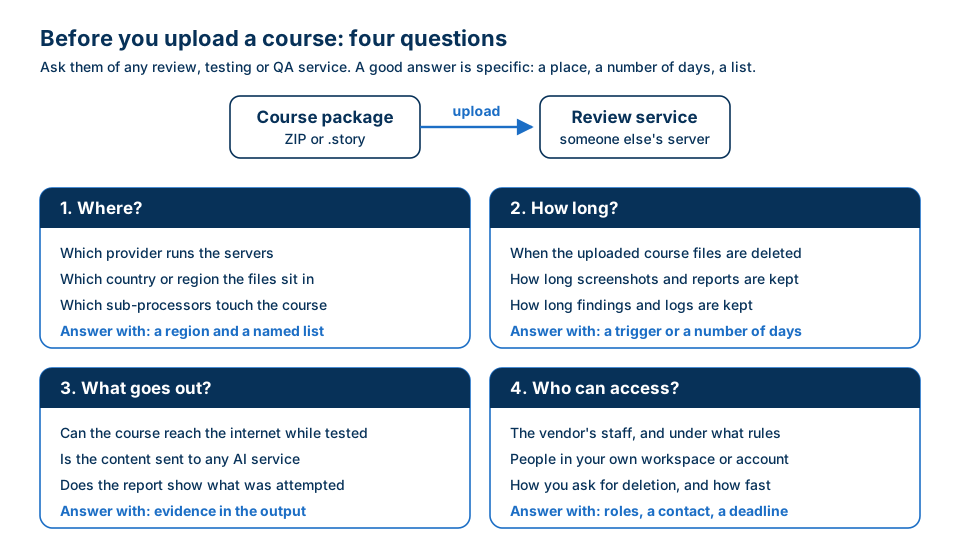 Before a course goes to any review, testing or QA service, ask four questions. A good answer is specific: a place, a number of days, a list.
Short answer: a secure e-learning course review starts before the review does. Know what the course contains, decide who may hold a copy, and before you upload it to any service, get specific answers to four questions: where it is stored and processed, how long each part of it is kept, what can leave while it is being tested, and who can access it. Then run the same test in the other direction: does the course itself send anything out when a learner opens it? You can answer that one yourself, with the browser you already have.
This post is for teams whose courses carry confidential training content: cyber and defense, healthcare, banking and insurance, legal, and any company that trains staff on internal systems. It covers what actually sits inside a course, what changes when a copy leaves your network, the questions a security questionnaire asks about the review step, how to check whether a course "phones home" with the browser's Network tab, and how to judge a review service by evidence rather than by its marketing. There is a checklist to copy near the end, and an FAQ.
I build e-learning courses for a living, more than 140 of them in Articulate Storyline, many of them security training. The awkward truth I learned early is that the course is often more sensitive than the documents it was built from. It takes the sensitive parts, the screens, the steps and the examples, and packs them into one neat folder that is easy to send.
Why "secure e-learning course review" is its own problem
Most QA advice assumes the course can go anywhere. Upload it to a test LMS, share a review link, drop the ZIP into an online checker, send it to a freelancer for proofreading. For a course about how to use the new expense form, that's fine.
For a course that teaches analysts how to triage an alert in your SIEM, it needs more thought. So does a course that walks nurses through the patient record screens, or one that shows the approval limits in a payments workflow. The content is the reason the course exists, and it is exactly the content your security team protects everywhere else.
So the review step creates a gap. The source documents live in a controlled repository. The final course lives in an LMS that went through procurement. In between, during authoring and review, copies of the course travel through email, file-sharing links, review tools and testers' laptops, and often nobody wrote a policy for them. That middle step is where confidential training content most easily slips out of the controls built for it, not through a breach but through convenience.
The answer isn't to never use an outside service. Hosted tools are how most teams work today, and many of them are run carefully. The answer is to make the review step a decision: you know what you're sending, you know where it goes, and you've asked the questions you'd ask of any other supplier.
If you've read how to QA an e-learning course from a vendor, you've seen the short version of this argument. This post is the long version.
What actually sits inside a course
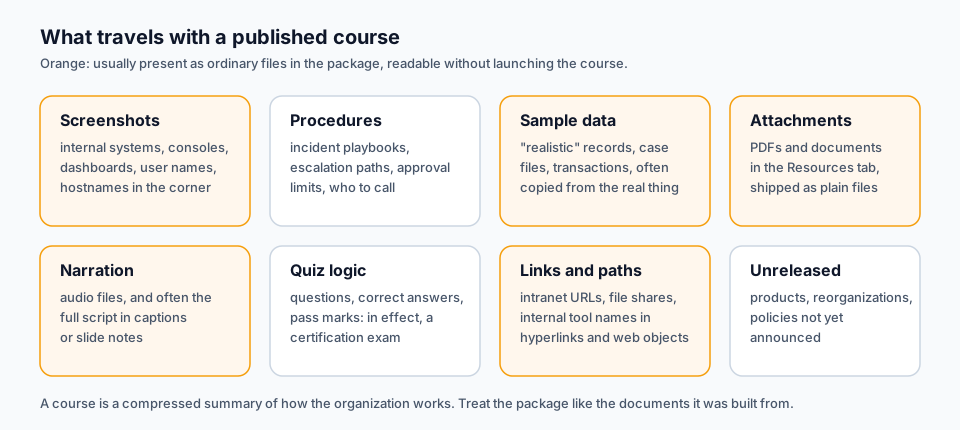 A published course is a compressed summary of how the organization works. Several parts of it can be opened without launching the course at all.
When people think of a course as "slides", they underestimate it. Open a published package and look at what's really there.
Screenshots of internal systems. Software training is built on screenshots, and screenshots carry more than the button you circled. The corner of the window shows a hostname. The user menu shows a real employee's name. The list behind the dialog shows real ticket titles, case numbers or customer names that nobody blurred, because the author was focused on the button. In security courses it is worse: a screenshot of a console can reveal which product you use, how it's configured, and what your internal naming looks like. In a published course, these images usually sit as ordinary image files in the package, readable by anyone who opens the folder.
Procedures and playbooks. A course on incident response is an incident response procedure, written in plain language and ordered step by step: who gets called first, what the escalation threshold is, which system is checked before which. Fraud training describes what triggers a review. Compliance training describes where the limits are. An outsider learns more from a well-made course than from the policy document, because the course was designed to be understood.
Realistic sample data. Scenario-based learning needs examples, and the easiest examples are real ones with the names changed. Sometimes the names aren't changed. A "sample" transaction list, a "fictional" patient record or a "made-up" phishing email is often copied from a real case and lightly edited.
Attachments. Job aids, checklists and reference PDFs in the course's Resources tab are shipped inside the package as plain files.
Narration and its script. Audio files sit in the package. If the course has closed captions, the full text of what is said is there too.
Quiz logic. The questions, the correct answers and the pass mark travel with the course. For a certification course, that is the exam and the answer key in one.
Links and paths. Hyperlinks to intranet pages, paths to internal file shares, names of internal tools, all visible in the course data and in any web object that points inward.
Things that aren't public yet. A product course is written months before launch. A reorganization course is written before the announcement. The course might be the earliest complete description of something your company hasn't told anyone about.
The source file, if you send it. The .story project holds everything above plus what the learner never sees: hidden layers, unused slides, speaker notes, old drafts of text, and every object name the author typed. If a service asks for the source file, that is a bigger disclosure than the published package, and it's worth deciding on purpose.
None of this is a reason to make courses less specific. Specific is what makes training work. It's a reason to treat the package the way you treat its sources.
What changes when a course leaves your network
Uploading a course to a hosted review, testing or proofreading service isn't wrong. But it changes the questions you have to answer, and it's worth seeing them listed in one place.
A copy now exists somewhere else. Not just the package: the service may extract images, render screenshots, generate a report, store findings, keep logs and make backups. Each of those is a copy, and each can have its own retention period. A service that deletes your ZIP after the scan but keeps screenshots of every slide for months has still kept a picture of most of your course.
Someone else's staff may have access. Support engineers, administrators, sometimes contractors. Their access is governed by the provider's policy, not yours.
There are sub-processors. The service runs on a cloud provider, signs users in through an identity service, sends email through another company, and may use a third for error reporting or analytics. Some of those touch only account data, some touch the course. You want to know which is which.
Location becomes a question. Which country are the files processed in? Where is the database? For many regulated organizations, "in the EU" or "in our country" is a requirement, not a preference.
Personal data changes the legal footing. If the course contains personal data, even a real name in a screenshot, then in the EU the provider handling it on your behalf is a processor, and the General Data Protection Regulation expects a contract with that processor (Article 28) and sufficient guarantees about how the data is protected. In US healthcare, a vendor that handles protected health information on your behalf is generally a business associate, and HHS publishes sample business associate agreement provisions for that contract. I'm not a lawyer, and this isn't legal advice. The point is practical: once a course with personal data leaves your systems, someone has to check whether a contract is needed, and that check takes time. The fastest way to shorten it is to keep real personal data out of the course in the first place.
It also turns into a supply-chain question. Security teams increasingly treat every outside service as part of their attack surface. NIST's guidance on cybersecurity supply chain risk management (SP 800-161 Rev. 1) is a good map of how large organizations think about this: every supplier that touches your information is a risk to be identified and managed.
For a platform you'll use every day, a full vendor review is worth doing. For a one-off check before a course goes live, most teams won't start a procurement cycle, so one of two things happens. Either the review is skipped, or someone uploads the course anyway and doesn't mention it. Neither is a good outcome. The four questions below are the short version of the review, the part you can do in an afternoon.
Four questions to ask before you upload a course
These work for any service that receives a course: a QA tool, a test LMS, a proofreading agency, a translation vendor. What separates a good answer from a weak one is specificity. "We take security seriously" answers none of them.
1. Where is it stored and processed?
Ask which provider runs the servers, in which country or region, and which other companies touch the files. A good answer names a region ("Frankfurt", not "Europe") and gives you a list of sub-processors, with what each one does. Note the split between course data and account data: the company that sends your invitation emails may never see a slide, and that's a perfectly fine answer as long as it's stated.
Also ask whether files are copied to any other storage: a separate file-hosting service, a content delivery network, a backup provider. Every extra place is another retention policy to read.
2. How long is each part kept?
"We delete your data when you delete your account" is a start, but a course review produces several kinds of data, and they rarely share one lifetime. Ask separately about:
- The uploaded files. Are they deleted after the scan, after a fixed period, or only when you delete them? What happens if the scan fails?
- Derived copies. Screenshots, rendered reports, extracted text. These often outlive the upload.
- Findings and metadata. The list of issues, slide titles, scan dates. Usually kept as long as your account or project exists, which is reasonable, but you should know it.
- Logs and backups. How long until a deleted item is gone from them too?
A good answer is a trigger ("deleted when the scan succeeds") or a number ("30 days"), for each kind of data.
3. What can leave while it's being tested?
This one is specific to e-learning, and most vendors haven't thought about it. A course is a web page. When a service tests it by playing it in a browser, the course can make requests of its own: to a video host, a font CDN, an analytics service. If the testing browser is open to the internet, your course is effectively being launched from the vendor's server, and every outside service the course calls learns that it was opened, from where, and when.
Ask whether the course is isolated while it runs, and whether the report shows what the course attempted. Ask the honest follow-up too: isolated at what level? A browser that blocks the course's own requests is a real control. A claim that the whole server is "air-gapped" is a much bigger claim, and for a web service it's rarely true. Prefer the vendor who tells you the precise boundary.
Ask, finally, whether the content is sent to any AI or machine-learning service for analysis. That isn't automatically bad, but it adds a sub-processor and often a retention policy of its own, and many security teams want to know.
4. Who can access it?
Ask which of the vendor's staff can open your files, and under what rules. Ask who in your own organization can see the results: is it everyone with the link, or members of a named workspace? And ask how you request deletion: a button, an email address, a deadline for the answer.
If a vendor answers all four questions on a public page, without you having to ask, that's already a good sign. A public answer can be checked, quoted and held to.
Security questionnaires: what they ask about the review step
If you've ever bought software for a regulated organization, you know the questionnaire. Sometimes it's a standard format, sometimes a spreadsheet the security team built. The questions about any tool that handles content map closely onto the four above:
- Does the tool store, transmit or process our data? Where?
- Which third parties (sub-processors) receive it?
- How long is it retained, and how is deletion handled?
- Who at the vendor can access it?
- What independent audit reports can you share? A SOC 2 report, for example, is a CPA's examination of a service organization's controls relevant to security, availability, processing integrity, confidentiality or privacy; the AICPA describes the SOC suite of services on its site.
- What network access does the tool need, and what does it contact?
When you read a vendor's answers, look for the same specificity as before. A region and a list of named sub-processors beats "industry-standard cloud infrastructure". A number of days beats "as long as necessary". A described isolation boundary beats "secure". And be fair to small vendors: a young product may not have a SOC 2 report yet. That isn't automatically disqualifying for a one-off review of a course without personal data, but it means the other answers have to carry more weight, and you should ask what they have instead.
The questionnaire also has a quieter purpose. Filling it in forces your own team to decide what the course is: internal, confidential, restricted. That classification is what tells you whether the four answers are good enough.
Evidence, not promises
Every service says it respects your privacy. The sentence costs nothing to write. What matters is whether you can check any part of it.
There's a phrase in privacy engineering for the difference: private by design, not by promise. A claim is a promise when the only proof is a policy page. It's closer to design when the system is built so that the behavior can be observed, and you can see the result.
For a hosted service you can't watch the vendor's servers, but you can still collect evidence:
- The published policy. Is it specific enough to quote? Does it name the region, the sub-processors and the retention periods? Specific claims are checkable claims, and a vendor that writes them down has made itself accountable for them.
- The output. Does the report say what happened on the network while the course was tested? A line that's computed during the run, not written in advance, is something your security team can file with the review.
- The behavior over time. Upload a test course, note the date, and check later whether the things the policy says are deleted are actually gone from your account. Ask for deletion once and time the answer.
- The limits the vendor admits. A vendor that tells you where its isolation stops is more believable than one that claims it has none. "The course is isolated in the browser; the server itself is online" is a sentence you can work with.
The third and fourth points are the ones most people skip, and they're often the most telling.
The reverse check: does the course itself phone home?
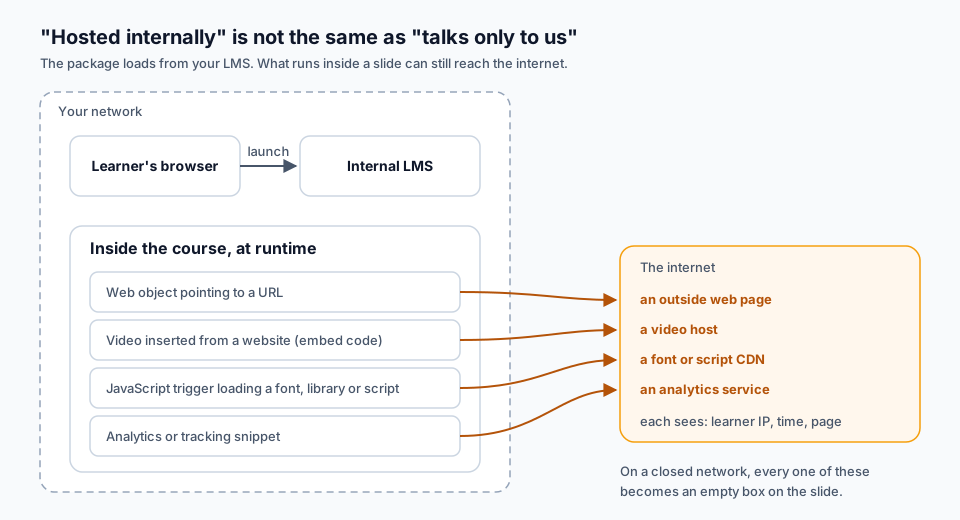 Hosting a course on your own LMS doesn't mean it talks only to your LMS. Anything inside a slide that points outward makes a request every time a learner opens that slide.
So far we've talked about the course leaking during review. There is a second leak, and it's quieter: the course leaking information about the learner, every time someone takes it. It's the data privacy question in e-learning that almost nobody asks during review.
Teams often assume that a course hosted on an internal LMS stays internal. The package is internal, yes. But a slide is a web page, and a web page can load things from anywhere. Each time it does, the outside server learns at least the learner's public IP address, the time, and usually which page asked. Across a whole workforce, that adds up to a fairly detailed record of who took which training and when, sitting on servers you never chose.
It also creates a reliability problem. If the course will run on a closed network, an air-gapped training range, a ship or a site with strict egress rules, every outside dependency becomes an empty box on the slide.
Where outside requests come from in an authoring-tool course
From the courses I've built and reviewed, these are the usual sources:
- Web objects that point to a URL. Articulate Storyline lets you insert a web object either from a local folder, which is then packaged with the course, or from a web address, which is loaded live (Articulate: adding web objects). The second kind is an outside request by design.
- Videos inserted from a website. Pasting a YouTube or Vimeo embed code is quick, and the video is then streamed from that host, not from your package (Articulate: adding videos). The host also gets to load its own player, scripts and, often, its own tracking.
- JavaScript triggers. Custom code is common in advanced courses (Articulate: JavaScript best practices). Code copied from a forum or a tutorial often loads a library, an animation framework or a web font from a public CDN.
- Fonts from a CDN. The fonts you format text with in Storyline are normally packaged with the published course. Outside fonts tend to arrive another way: through a web object built as its own little web page, or through a script that pulls in a stylesheet.
- Analytics and tracking snippets. Sometimes added on purpose to measure engagement, sometimes left behind in a template or a web object by a previous project.
- Images and links that point outward. An image referenced by URL rather than imported, or a "learn more" link that opens a public page. A link only goes out when it's clicked, but it's still worth knowing about.
None of these is wrong in itself. A designer might embed a public video on purpose, and in an open course that may be fine. The point is that someone should decide it, knowing it's there, instead of discovering it from a firewall alert after launch.
How to check it yourself with the Network tab
You don't need any service for this, and for a highly sensitive course it's a perfectly legitimate way to do the whole check without the package leaving your machine. Every modern browser has a Network panel in its developer tools. Here is the method I use, in Chrome, based on Google's Network panel documentation and its feature reference:
- Launch the course where learners will. Ideally your LMS's test area, or a local copy of the published output. Open developer tools (F12, or Ctrl+Shift+J / Cmd+Option+J) and switch to the Network tab before the course loads. DevTools only records while it is open, so reload once it's open.
- Check "Disable cache" and "Preserve log". Disabling the cache makes the browser request everything again, as a first-time learner would. Preserving the log keeps the record when the course moves between pages or frames.
- Show the Domain column. Right-click any column header and turn on Domain, then sort by it. Your LMS's domain, or no domain at all for local files, should account for almost everything. Anything else stands out immediately.
- Take the course properly. Outside requests happen when a slide plays, not when the course opens. Go through every slide, open layers, play media, answer the questions. A video embedded on slide 3.7 makes no request until someone reaches slide 3.7.
- Filter for a suspect. Type
domain:followed by a domain name into the filter box to see everything that went to one host, and from which file the request came. - Simulate a closed network. Run a local copy of the published course on a machine with no internet access, or ask your network team for a test machine that can reach only the LMS. Every slide that now shows a blank area, a spinning loader or a broken image depends on the outside world. (The Offline option in the Network panel's throttling menu cuts the browser off completely, so it only helps when the course runs from local files.)
- Write it down. For each outside domain: which slide, what kind of resource (script, font, video, image, page), and whether it was intended.
If you control the hosting, there is a stricter version of the same test. A Content Security Policy on your staging server that allows only your own origin makes the browser block and report every outside request, so nothing is missed because you skipped a layer. That's a job for whoever runs the server, but it turns "we think the course is self-contained" into "the browser enforced it".
The trade-off of the manual route is time and coverage. Taking every slide, every layer and every branch by hand is slow, and the request you miss is usually on the layer you didn't open. That's where a tool helps, as long as the tool itself passes the four questions.
What to do with what you find
For each outside request, there are three honest answers:
- Package it. A web object built from a local folder, a video imported as a file instead of embedded from a host, a library saved into the web object folder instead of pulled from a CDN. The course gets a little bigger and stops depending on anyone.
- Keep it, and declare it. Some courses really should link to a public resource. Then write it into the course's documentation and tell the team that manages the firewall which domains it needs.
- Remove it. Analytics nobody reads and leftovers from a template are the most common examples.
How to evaluate a review service by evidence
Here's how I'd put any hosted course review service, including ours, through its paces before trusting it with confidential training content. None of it requires the vendor's cooperation.
Start with a course you'd be happy to publish. Your first upload to any new service should be a test course with nothing sensitive in it: a demo, a template, a course built for the purpose. You learn how the service works without risking anything.
Plant something you can recognize. Put a web object or an image in that test course that points to an address you control, a page on your own site or a server your team can watch. Then scan it. If the service lets the course run open to the internet, your server will see a request from the vendor's machine. If the service isolates the course, your server sees nothing, and the report should tell you that the course tried and was blocked. This is the most direct evidence you can get about point 3, and it costs ten minutes.
Read the report's statement about the network. Does it exist? Is it computed from that scan? Does it name the outside addresses the course attempted, and on which slide? A report that records the course's network behavior is something your security team can file. A privacy page they have to trust can't be filed that way.
Test the retention claims. Note what the policy says is deleted and when. Come back after that period and look: are the files, screenshots and reports gone from your account? Then ask, once, for deletion of something by email, and see how long the answer takes.
Check what you upload. If a service offers to scan the source file as well as the published output, decide whether you need it for this course. The source gives a fuller result, and it's also a bigger disclosure. For most courses that's a fine trade; for the most sensitive ones it's a choice someone should make on purpose.
Be precise about what isn't covered. A hosted service with good answers still sits on someone else's infrastructure. It doesn't replace your own handling rules for the course, your classification, or your security team's judgment. It only means that one more place the course goes has been checked.
Where Story Checker fits
Story Checker is a QA tool for courses built in Articulate Storyline. It's a hosted website: you upload the course, and it is scanned on our server. Here are its answers to the four questions, taken from the privacy policy, so you can check them yourself.
- What you upload. The published course as a ZIP (Web or LMS publish), the
.storysource file, or both. For the full set of results, both. There is no scanning by URL. - Where. Scans run on a Google Cloud virtual machine in Frankfurt (europe-west3). Account, workspace and findings data are stored in Supabase in the EU (Frankfurt, eu-central-1). Course files aren't kept in any other third-party file storage.
- How long. The uploaded course files are deleted when the scan succeeds. After a failed scan they are kept for up to 24 hours, so the scan can be run again, and then deleted; a nightly cleanup removes anything left over. Screenshots and the HTML report are kept for 30 days. Findings are kept until you delete the workspace or the account.
- What goes out during the scan. The course plays in an isolated browser. Every attempt by the course to reach an address on the internet is blocked and recorded, and the report ends with an evidence line showing what was attempted and what was blocked. Attempts also appear as findings, on the slide where they happened, with the fix in Storyline's terms. To be precise about the boundary: the isolation is at the browser level. The server itself has an internet connection, like any server. It is not an air-gapped system, and we don't claim it is.
- No AI. The checks are deterministic: the same course gives the same report. The course isn't sent to any AI service.
- Who and how to delete. The policy lists every sub-processor and what it does, and explains how to delete a workspace or an account, or to ask for deletion by email.
It's also not an accessibility checker. Storyline has a built-in accessibility checker for that.
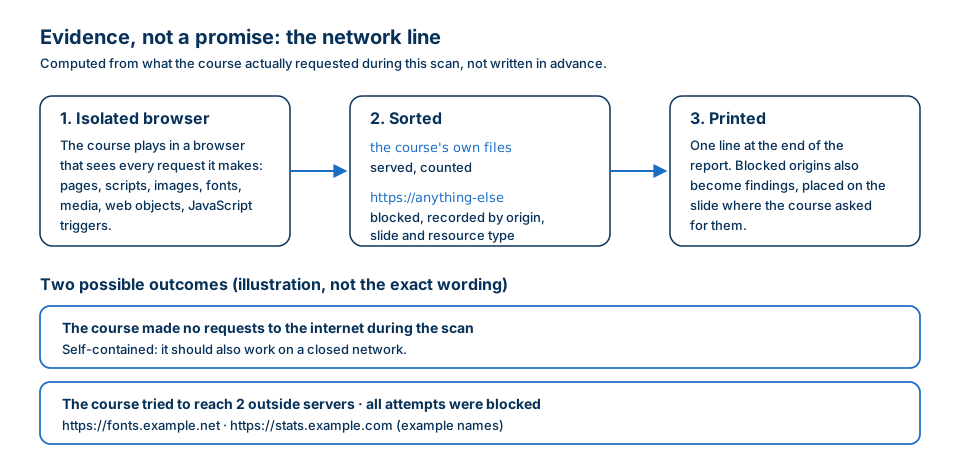 How the network line is produced. The two lines at the bottom illustrate the clean case and the case where the course tried to reach outside servers. The wording and the server names are examples.
Secure course review checklist
Copy this into your review procedure.
Before review
- The course is classified like its source documents (internal, confidential, restricted)
- The people and services allowed to hold a copy of the package are named
- Screenshots checked for names, hostnames, case numbers and real records
- Sample data checked: invented, or copied from a real case?
- Attachments and narration scripts checked like the slides
- Decided whether the source file needs to go, or only the published package
Before you upload to any service
- Where: provider, region and sub-processors are named
- How long: retention known separately for files, screenshots and reports, findings, and logs
- What goes out: the course is isolated while tested, and the boundary of that isolation is stated
- What goes out: you know whether content is sent to any AI service
- Who: vendor staff access, workspace access and the deletion route are known
- First upload was a non-sensitive test course
- A planted outside address showed whether the course could reach the internet
- The report records the course's network activity during the scan
The course's own network behavior
- Taken from start to finish with the Network tab open, cache disabled, log preserved
- Every outside domain listed with slide, resource type and owner
- Web objects built from local folders, not URLs, unless intended
- Videos imported into the course, not embedded from a host, unless intended
- JavaScript triggers checked for CDN libraries, fonts and analytics
- Course run once on a machine with no internet access
- Remaining outside domains documented and shared with the network team
Sign-off
- Review findings and the network evidence stored with the course record
- Copies made for review deleted, or checked against the service's retention periods
FAQ
What should I ask before uploading a course to a review service?
Four things: where the files are stored and processed (provider, region, sub-processors), how long each kind of data is kept (the files, screenshots and reports, findings), what can leave while the course is tested (is it isolated, is anything sent to an AI service), and who can access it, including how you request deletion.
How can I tell if an e-learning course sends data to outside servers?
Open your browser's developer tools on the Network tab before launching the course, disable the cache, preserve the log, and show the Domain column. Take the whole course, including layers and media. Any domain other than your LMS, or local files, is an outside request worth explaining.
Why would a course hosted on our own LMS contact the internet?
Because the content inside it can point outward: web objects that load a URL, videos embedded from a video host, JavaScript that pulls a library or font from a CDN, or an analytics snippet. Hosting the package internally doesn't change where those parts load from.
Is uploading a course to a review tool a GDPR issue?
It can be, if the course contains personal data such as a real name in a screenshot. A service handling that data on your behalf is generally a processor, and the GDPR sets out what the contract with a processor must cover. Ask your data protection officer. The safest first step is not to put personal data in the course at all.
Can I review a confidential course without uploading it anywhere?
Yes. Take the published course on a machine inside your network with the browser's Network tab open, and run it once on a machine with no internet access. It's slower and easier to miss a layer than with a tool, but nothing leaves your machine.
Is a hosted QA tool that blocks the course's requests the same as an air gap?
No. Blocking in the browser stops the course from reaching the internet during the scan, which is a real and checkable control. The server running the scan is still connected to the internet. Ask any vendor to state exactly where its isolation stops.
Conclusion
The content of a confidential course is the reason the course exists. Reviewing it can mean sending it somewhere, as long as that is a decision and not a habit. Know what's in the package, ask every service the four questions and expect specific answers, collect a little evidence of your own, and run the same test on the course itself, because a course that calls outside servers leaks a little about every learner who opens it.
For more on the review itself, see how to QA an e-learning course from a vendor, why a course can work in Storyline Preview but not in the LMS, and how to build an e-learning QA process your team can repeat.
If you review Storyline courses, try Story Checker. Read the privacy policy first, then upload a test course and look at the network line at the end of the report.
Story Checker is an independent tool and is not affiliated with or endorsed by Articulate Global, LLC.